So it’s been a while since I last purchased something using Bitcoin
and I wanted to see if the process had become any less painful today. I
decided that I was going to purchase a $10 item at a shop that accepted
Bitcoin.
I head on over to my Coinbase
account and purchase $10 of Bitcoin. Due to fees the amount I actually
got was only worth $8. Okay, I buy some more to make it $10, then I try
to send the money to the address I was given by the shop. Turns out that
Coinbase doesn’t actually let you send Bitcoin to non-Coinbase users
anymore unless you wait 12 days after you purchase it. Even if I could
send the money, the estimated fee was over $3 (30% of the transaction).
I ended up paying with PayPal and have asked Coinbase for a refund on my Bitcoin purchases.
A few weeks ago my OnePlus 3 camera stopped focusing properly meaning
I could no longer take photos of text or scan QR codes. After doing a
bit of research on the OnePlus community forums I found that this was likely an issue with the hardware stablization of the camera getting stuck.
If your stabilizer is stuck you may be able to fix it by just giving
your phone a good shake. However, the solution for me was to take a
refrigerator magnet and move it over the external camera module several
times (you should hear the camera moving back and forth inside).
If the magnet solution does not work it seems like some people have had success opening their phone and placing a metal object like paperclip or staple next to the camera module. Below is a video I found on YouTube of someone doing so. That said, I believe that opening your phone will void your warranty so if you are near a OnePlus service center I would recommend you give them a visit to see if they can fix your problem first.
I recently learned about a new messaging app called Delta chat.
It is based on top of SMTP/IMAP and works with an existing email
account so you can chat with anyone who has email already (everyone?)
regardless of if they have Delta chat.
Basically, it is an email client that uses a UI similar to most chat apps. I think this is better than something like a Jabber client because nobody actually has Jabber accounts anymore, but email is still ubiquitous.
There are some problems I foresee:
Many free email providers limit messages to 200-300 per day, which may be a problem for some.
Depending on the email server messages can sometimes take quite a long time to be received.
This isn’t the first version of this idea that I’ve seen. There are other apps like MailTime but Delta chat is open-source at least and has mobile and desktop clients.
I am skeptical of all of these cloud bookmarking services that have started popping up. Some examples are Pocket, Wallabag, and Instapaper.
It seems to me that if you use these services as advertised
(bookmarking articles you don’t have time to read at the moment) then
you are going to end up with a library large enough that you will never
have enough time to read it all. Additionally, most news content is only
relevant for a couple of days or less, so I suspect it would just end
up sitting in your bookmarks never getting read.
Just found out about the 402 HTTP status code: Payment Required. I wonder if it could be used for a server and client to negotiate payment for a particular page.
Perhaps a site could display a paywall notification with 402 status
code asking visitors to pay a one time fee to access the page.
There are lots of sites that try to push you to use their mobile apps, Quora
is one of the most egregious offenders that I have seen. If you try to
browse more than a single page, they block you with a non-dismissable
pop-up telling you to install their app.
Why even bother having a mobile website if they don’t allow people to use it.
On the desktop they have a similar pop-up that forces you to sign in to a Quora account to keep browsing. Very user hostile behavior. Additionally, they use social media logins which I’ve previously stated my distaste for but that’s only a minor complaint.
We’ll have to see how it plays out, I’m not sure that there is a very
large market for them yet but it’s nice to have a simple online store
to buy phones with no Google Play services.
After purchasing audiobooks on Audible you may want to store the files on your computer in case Amazon decides to pull the books later on. Audible allows you to download encrypted copies of your books from your account library.
Clicking on the “Download” link for any audiobook will download a
.aax file to your computer. This file contains audio data that has been
encrypted using a 4-byte key unique to your Audible account. Because the
key is so short it is trivial to break it using brute force and there
is plenty of software available specifically for that purpose. In this
blog post, I’ll be covering two ways to decrypt the file.
OpenAudible
OpenAudible a free open-source graphical program available for Linux, Windows, and macOS. It’s specifically designed to remove DRM from your Audible files and hides a lot of the complexity.
EDIT: OpenAudible appears to have become closed source and paid software. You can buy it if you want or try to find an old version, but see below for a free method.
Once you install OpenAudible from its website you can drag and drop the .aax files you downloaded from Audible into it. They will show up in a list at the bottom of the window.
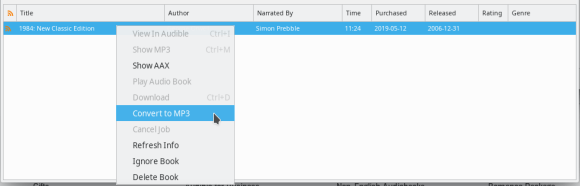
With your audiobooks loaded select them (Ctrl + A) and right-click to select “Convert to MP3”.
OpenAudible will convert each of your audiobooks to a DRM-free mp3
file and save them in the ~/OpenAudible folder on your computer. If you
can’t find the mp3 files then right-click one of the books and select
“Show MP3”.
One nice thing about OpenAudible over the FFMPEG method is that the
book’s metadata (author, reader, publisher, etc.) will be preserved in
the resulting mp3 file.
FFMPEG
ffmpeg is a popular free and open-source command line utility for processing video and audio. It can decrypt the Audible DRM but requires you to input the specific 4-byte encryption key unique to your Audible account. You can brute force your downloaded .aax files (you only need to get the key from one, and it will work for the others) using this website.
Once you’ve gotten your key you can use it to convert your .aax files to mp3s using ffmpeg like so (replace XXXX with your key):




 Kyle Piira